How can I manually upload usage data through an API client
Last updated: July 2, 2024
Check out our video tutorial here.
Download an API client and launch your API client.
These instructions will walk through the process using Altair GraphQL client - download for free here
Log into Salesbricks and navigate to Settings > Integrations and click APIs - take me there.
Copy your API Token
Following our API overview docs configure the authentication header in your API client (use X-SALESBRICKS-KEY as the header key and your API Token as the header value)
Copy the Usage API endpoint URL (found in the API docs under Authentication) and paste this into the URL section of your request.
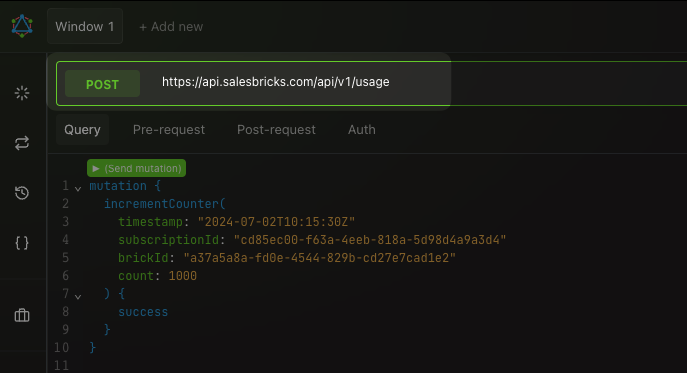
Copy the example API call body for incrementCounter Mutation or setGauge Mutation
Enter a timestamp within the customer subscription window. The time entered is UTC server time which will likely be several hours different from your local time.
Usage data is billed in arrears so data entered will be included in the customer's invoice for the following month
In Salesbricks copy the desired customer's Subscription ID - take me to Customers
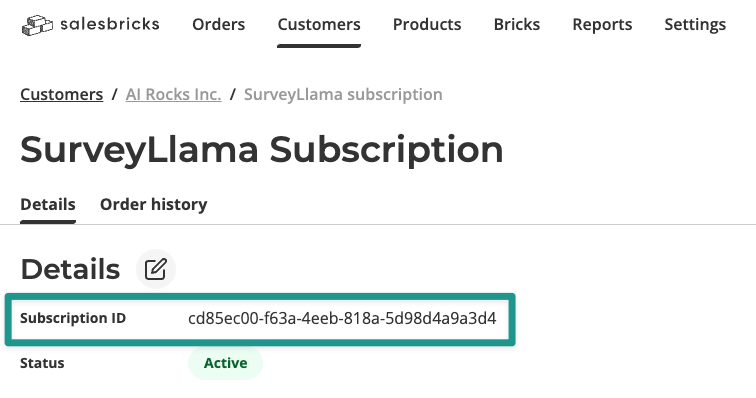
Paste this ID into the API call body next to
subscriptionId:In Salesbricks under the Bricks tab locate your usage brick and click on the edit icon for that brick. Copy the brickID from the URL
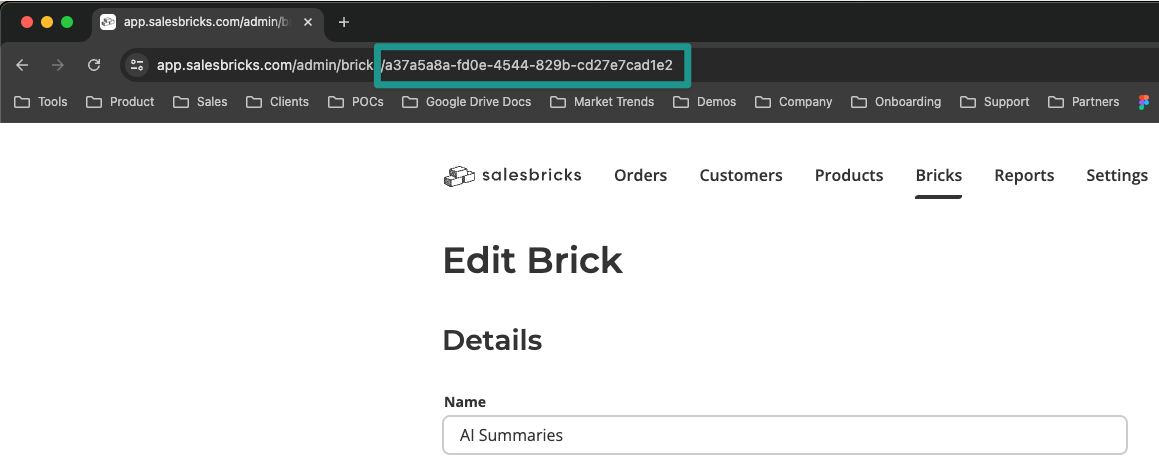
Paste the brickID into your API call body next to
brickID:Enter the usage quantity you want to add to the customer's bill next
count:
With the incrementCounter mutation, Salesbricks will sum the total number of units sent for a given billing period. For example, if one counter is sent in week one for 10 units and another call in week 4 for 20 units, Salebricks will add those (30) and bill the customer for that quantity in the next month's invoice.