How do I set the billing start date on an order?
Last updated: September 12, 2026
The billing start date tells Salesbricks when to begin managing billing for an order.
Use it when Salesbricks should not send or charge anything before a certain date — for example, when an earlier period was already billed outside Salesbricks, or when the customer shouldn't be billed for the start of their contract.
Want the customer to still pay the full contract value, just later?
A billing start date skips earlier invoices rather than moving them. To shift the first payment to a later date without losing any contract value, use a custom billing frequency instead. See How do I defer the first invoice to a future date?
How It Works
Invoices dated before the billing start date are muted — they are not emailed to the customer or charged to their payment method, and they are not rescheduled. The first invoice sent is the first one dated on or after the billing start date.
Steps
Open the order in the order builder and scroll to Deal structure.
Under Billing, select Custom.
In the Billing start date field that appears, choose the date Salesbricks should begin billing.
Continue building the order as usual. You'll see a note that Salesbricks will not manage billing until the billing start date.
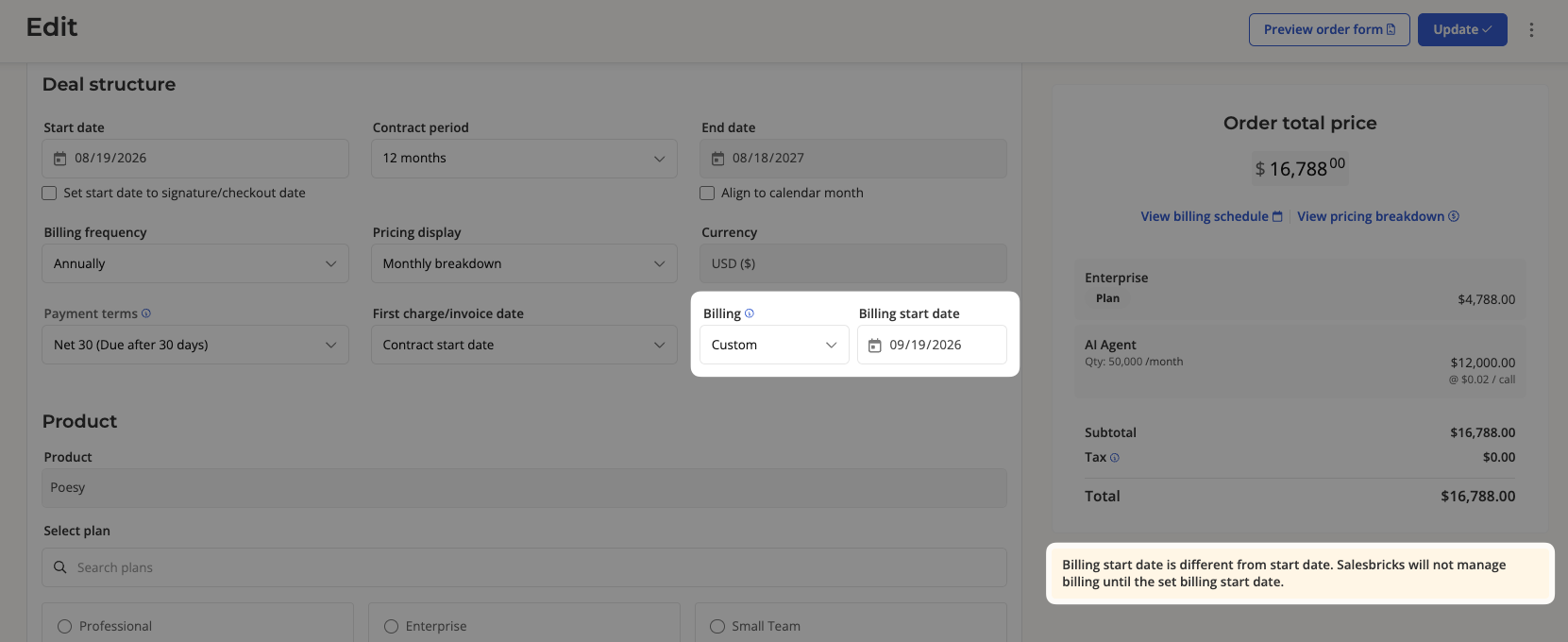
Hover over the info icon next to Billing to confirm the date Salesbricks will begin managing billing for this order.
If you don't see the Billing dropdown, this feature may not be enabled for your account. Reach out to Salesbricks Support and we'll get you set up.