Adjustment credits
Last updated: May 7, 2026
What are adjustment credits?
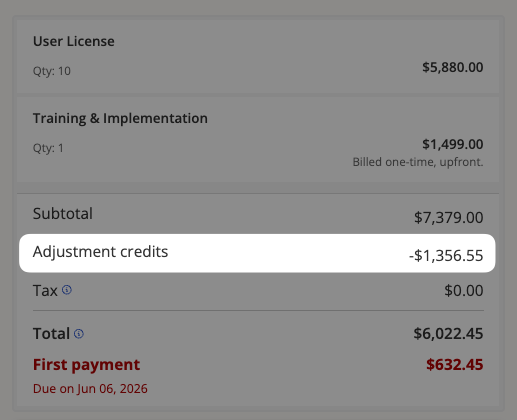
If you are recasting a closed order, you may see something called "adjustment credits" deducted from the total cost of the order.
Adjustment credits are the prorated unused remainder of the active subscription.
Let's say that your customer closed and paid for a 6-month contract for a $99/month starter plan. Then, they decide they need to recast the order during month 5.
Since the subscription had not entered the 6th and final month, the cost for that month would be applied to the recast automatically as an adjustment credit.
How do I edit adjustment credits on an order?
If you need to edit adjustment credits, or remove them from the order entirely, here’s how:
Find the order, and click the edit icon.
In the order builder, scroll down to the Discounts section and click on Add/Edit discount.

Update the adjustment credits and add a reason for the change.
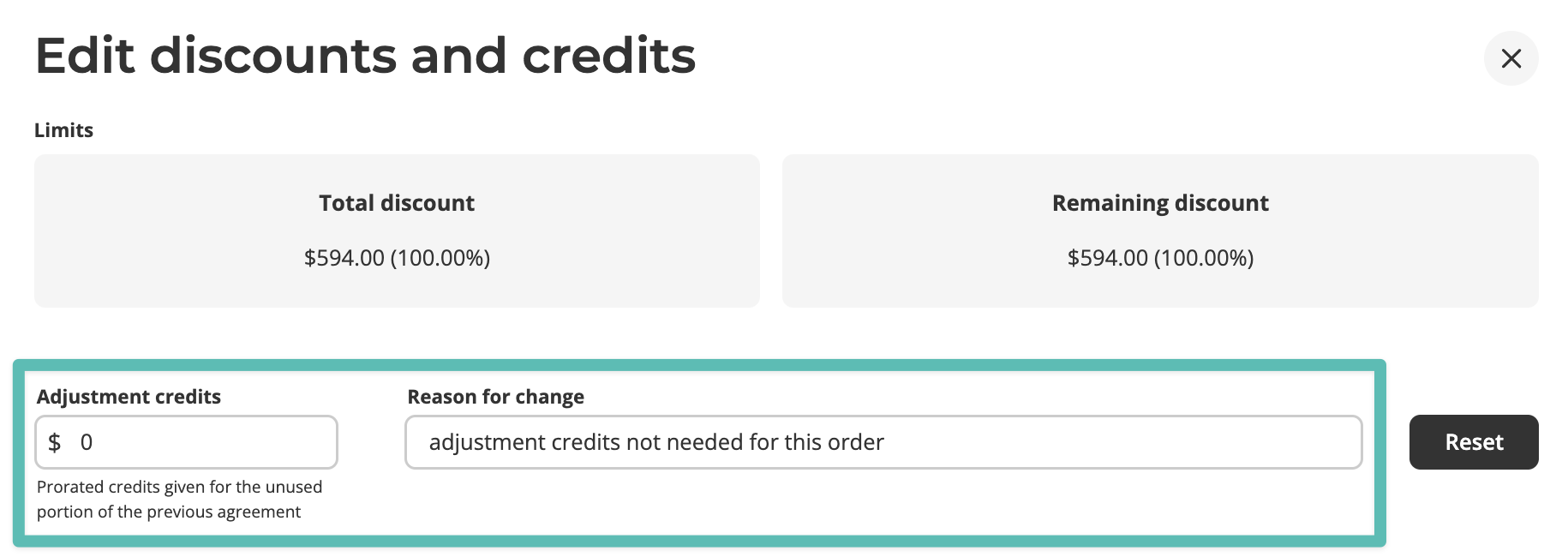
You do not need to click "Reset" when attempting to save adjustment credits - this button is simply for reverting the field back to its original state.
Click “Apply discounts” to see the adjustment credits updated on the order.